- baseline[1..10]
- resource_calendars
- cost_rate_tables
- custom_fields.text[1..30]
- task_notes.rtf
- wbs_codes
- deadline_constraints
- earned_value.bcws
Microsoft Project on Mac, iPad & iPhone
Open their .mpp on a Mac. Send it back intact.
A converter reads your .mpp into its own model and writes a new file, so anything the model has no slot for is left out (which Mac schedulers write .mpp at all). ProjectKiller patches only the bytes you edited — the rest of the file goes home exactly as it arrived.
For the consultant, contract scheduler or small firm whose schedule is a client deliverable — and whose client runs Microsoft Project on Windows.
 The only reason you still run Parallels
Free tier · no credit card · save and send back 3 .mpp files
Paid plans are billed by Apple, so Apple handles refunds — you never have to ask a one-person company for your money back.
Pro is 14 days free, then $20 a month — cancel any time in your Apple account.
Before you send it back, see what is in it
Drop the .mpp your client sent you. It is read in your browser — nothing is uploaded — and you will see every stream that has to survive the return trip, including the ones a converter would rebuild from scratch.
- File
- —
- Size
- —
- Streams
- —
- Storages
- —
- Sectors
- —
- Sector size
- —
— filled squares are sectors carrying real data. ProjectKiller rewrites only the ones your edit touches.
| Stream | Size | Share of data |
|---|
Native Mac, iPad & iPhone app — built and shipping in 2026
macOS 14+, iPadOS 17+ & iOS 17+ · Universal Purchase
1,157 named tests
Local-first — your files never leave the disk

The round trip
The file comes back lighter than it went out.
A field the converter doesn't understand is gone the moment it saves. Not corrupted. Quietly absent — and you find out on the call, in front of the client.
- baseline[1..10]
- resource_calendars
- cost_rate_tables
- custom_fields.text[1..30]
- task_notes.rtf
- wbs_codes
- deadline_constraints
- earned_value.bcws
The person on the other end opens it in Microsoft Project and sees their file. Not your interpretation of their file.
Thirty capabilities are tested against Microsoft Project every build: start and finish dates, durations, task dependencies with lag, all eight constraint types, custom text, number and date fields, cost rate tables A to E, calendars and calendar exceptions, formatted notes, WBS and outline codes, outline hierarchy, baselines and interim plans. Structures the app does not edit, such as deadlines, earned value fields and recurring task definitions, are returned byte for byte because they are never rewritten. You don't have to take that on faith: run the inspector at the top of this page on your own file.
Don't take our word for it
Here is the file, open in Microsoft Project.
This is ProjectKiller-Sample.mpp — written by ProjectKiller on a Mac, then opened in Microsoft Project Professional on Windows. Dependencies, constraints, milestones, summary rollups and durations, all intact. Download the same file and run the test yourself before you pay anything.
00:00 / 00:16
Download the sample .mpp
378 KB · open it in whatever you already trust
The thing no one publishes
Who can actually write the file back?
Opening an .mpp is the easy half, and everyone does it. Writing a real binary .mpp back out is where the category thins to almost nothing — and we have not yet reproduced a round trip through either of the two that manage it, so the table says “Not tested” rather than guess.
| Mac scheduler | Opens .mpp | Writes binary .mpp | Untouched data kept on save |
|---|---|---|---|
| Merlin Project$229.99/yr, iPad sold separately | Yes | No | No .mpp saveExports MS Project XML only |
| OmniPlan 4 Standard$199.99 perpetual | Pro only | No | No .mpp save.mpp export is a Pro feature |
| OmniPlan 4 Pro$399.99 perpetual | Yes | Yes | Not testedOmni publishes a list of what its export drops |
| Planner (was Project for the web)Retired as Project, 1 Aug 2025 | Partial | No | No .mpp saveLoses resources and baselines on import |
| Project Plan 365$129.99/yr on the App Store | Yes | Yes | Not testedVendor says it opens and saves .mpp |
| ProjectLibreFree · Apple Silicon only since 1.9.8 | Yes | No | No .mpp saveSave As writes XML; no .mpp writer exists |
| GanttProjectFree · signed Intel and Silicon builds | Yes | No | No .mpp saveMSPDI/MPX only; baselines not imported at all |
| Smartsheet$9–19/user/mo | Yes | No | No .mpp saveExports XML; constraints unsupported |
| Wrike$10–25/user/mo | Yes | No | No .mpp saveExport to Project “not on our roadmap” |
| ProjectKiller14 days free, then $20/mo | Yes | Yes | Yes30 named round-trip tests |
MPXJthe library most of them are built on
“Can I use MPXJ to write MPP files? Not at present. Although it is technically feasible to generate an MPP file, the knowledge we have of the file structure is still relatively incomplete…”
This is why the column above is mostly “No”. The open-source library the category is built on reads .mpp and cannot write it — so almost everyone routes you out through XML instead. ProjectKiller does not use it.
Compiled from each vendor's own published documentation and store pricing, August 2026 — ProjectWizards' import/export FAQ, the OmniPlan 4 manual's “what doesn't carry over” list, Wrike's own help centre, Microsoft's published “features that don't migrate” list, and ProjectLibre's own source tree — where the Microsoft Project exporter class is empty and the bundled library ships readers only. Prices and capabilities change; check them before you take our word for it.
Why XML export is not a substitute
Somewhere downstream, the native file is the deliverable.
Your client may never quote a DoD data item at you. But this is the clearest published statement of why an XML export is not the same artifact as the file itself — and if your work touches a federal program, it is the standard your schedule is measured against.
-
Contractor-defined fields
The DID requires a data dictionary of every custom field, definition and code structure used within the native schedule file. A converter that silently drops Text1–Text30 drops the thing the dictionary describes.
-
Schedule risk inputs
Three-point estimates from the most recent schedule risk assessment must be provided in the native schedule file submission. They do not survive a round trip through a tool that has no field for them.
-
Resource loading
Resource-loaded schedules may be required in the native file. Assignments, calendars and cost rate tables have to come back exactly as they went out.
A converter that quietly drops a field is not losing data. It is failing a contract deliverable.
DI-MGMT-81861C§1.6.2.2IPMDAR
“The Native Schedule File consistent with the contractor's schedule tool (e.g., MPP, XER). The Data Dictionary shall be included as part of the contractor's Native Schedule File…”
Integrated Program Management Data and Analysis Report, revision C, approved 30 Aug 2021; identical wording in revision B (2020). Revision D (DI-MGMT-81861D, March 2026) keeps the requirement: the schedule dataset is still accompanied by the native schedule file.
Requirements are set by your CDRL, not by this page. Read yours — and if your program runs on Primavera and XER, ProjectKiller is not the tool you need.
How it works
Patch the bytes. Leave the rest alone.
-
Open
The .mpp is read in place, at any size. Nothing is translated on the way in, so nothing can be lost on the way in.
-
Edit
You move a date. The scheduling engine resolves the change locally and computes the minimal byte delta that expresses it.
-
Save
Only those bytes are written. Every structure you didn't touch is bit-identical to the file you were sent — including the ones ProjectKiller never displays.
rev14.mpp — 4.2 MB
one date moved
Bytes rewritten 312
Of file 0.007%
Everything else returned as received
Schematic, not a live file operation — each square stands for a region of the file. Toggle it to see the difference in what gets rewritten.
Six ways to look at it
One schedule. Six ways to interrogate it.
View 01
Big Picture
Full CPM Gantt with critical path, float, dependency logic and baselines. The chart you would defend in a schedule review.

View 02
Team
Cross-project resource allocation, so the conflict shows up before the commitment does.


This Week
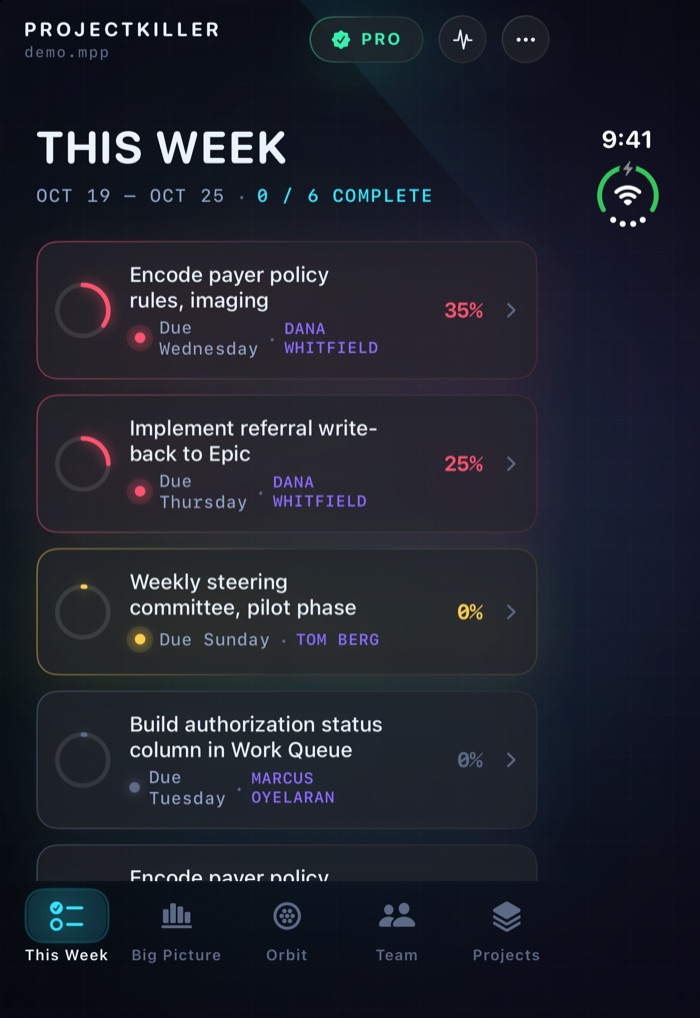
The plan collapsed to the seven days you can still do something about.

Orbit
Where the weight of the project sits, and what it is circling.

Insights
Monte Carlo, tornado sensitivity and earned value — run locally.
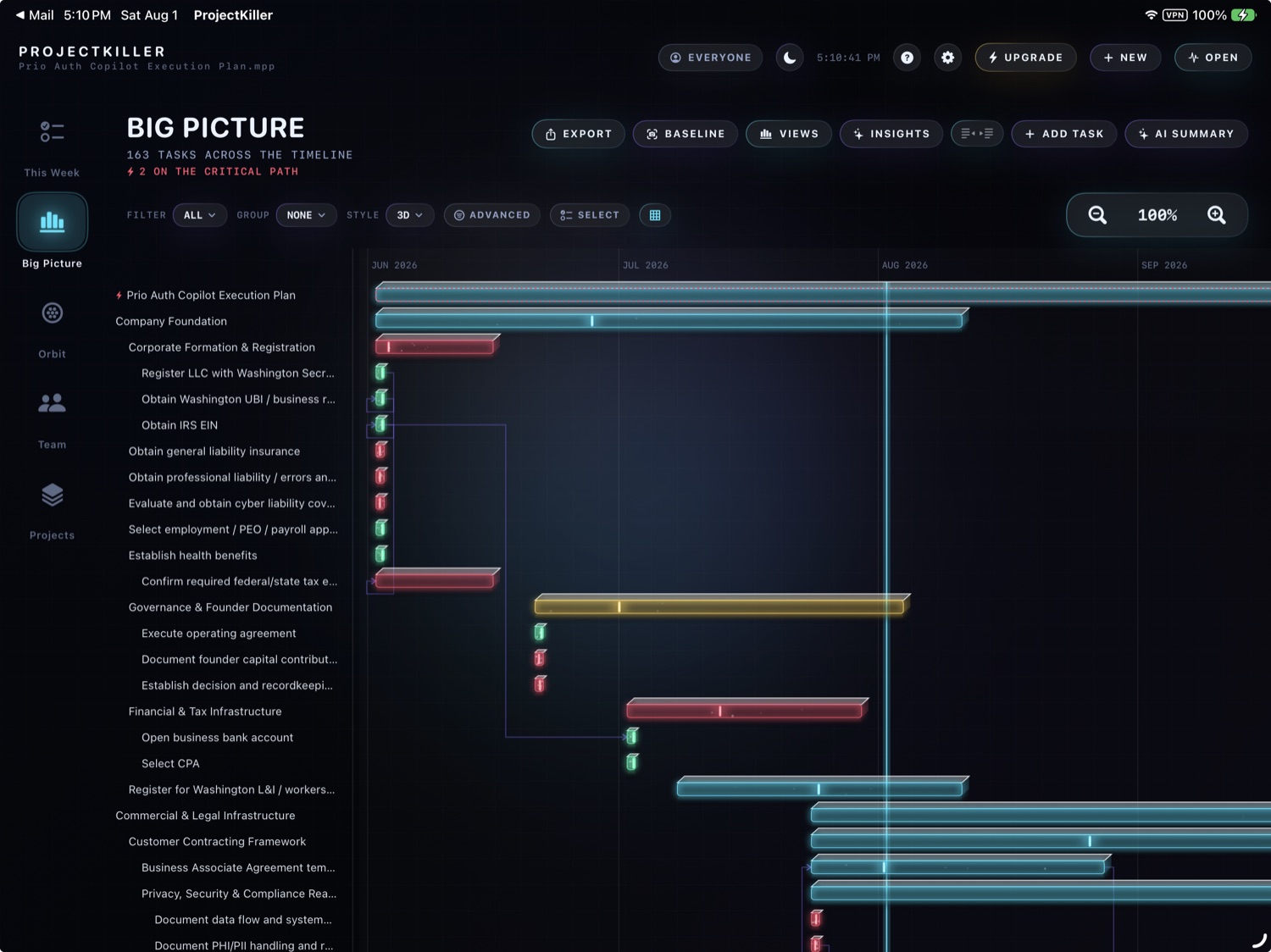
iPad
Same engine, same file, offline. Universal Purchase covers Mac, iPad and iPhone. Watch 27 seconds on iPad.
iPhone · iPhone Duo
In your pocket
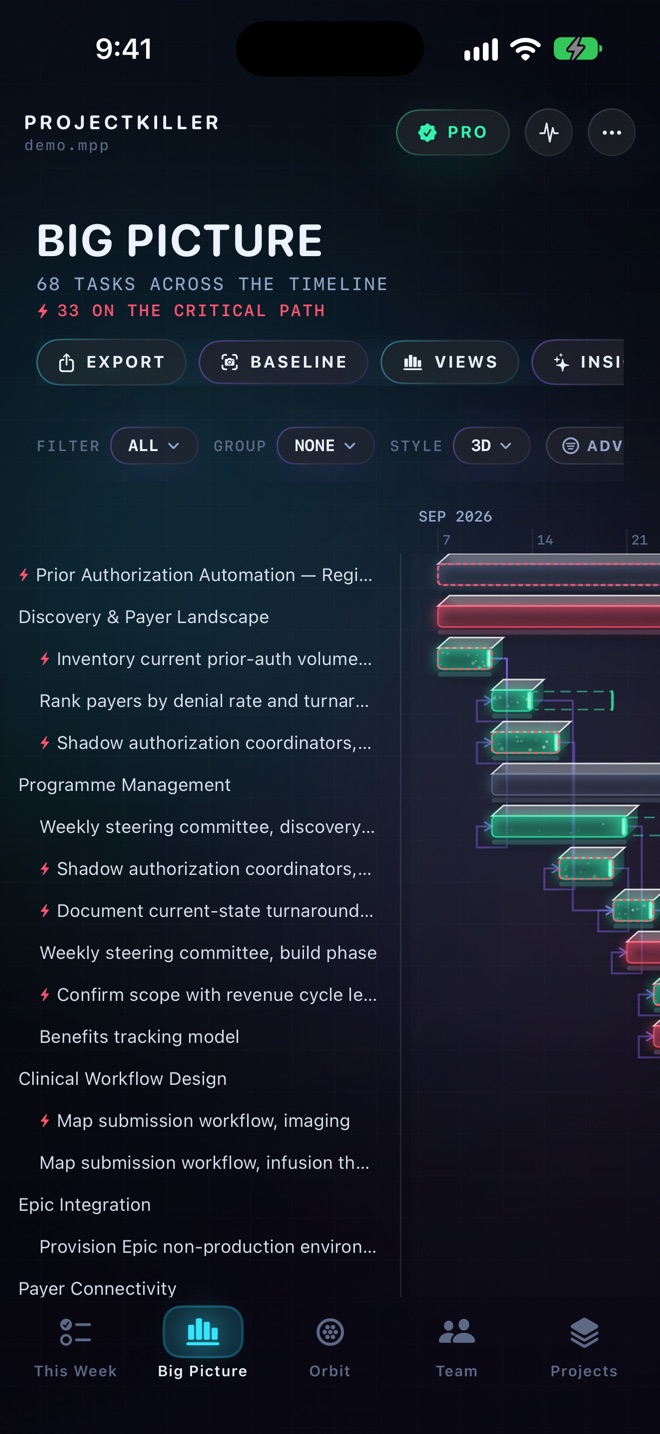
The whole app on iPhone, not a viewer. The tabs move to a bar along the bottom, and the .mpp is the same file, patched the same way, offline.
On iPhone Duo, closed, the outer screen gets the phone layout. Open, the app splits at the fold: your view on one side, a second one on the other, so the Gantt and This Week sit side by side without crossing the hinge.
The decision log
Every time a date moves, one question: why.
Six months from now someone will ask how eleven days appeared out of nowhere. Most schedules can only show that it happened. Yours will show why, when, and who said so — timestamped, in order, next to the task it belongs to.
It takes four seconds at the moment you already know the answer. It is the difference between a variance report and an argument.
Decision logClientCo-Phase-2-rev14.mpp
Finish moved to 03 Oct
Vendor slipped the long-lead delivery. Confirmed by their PM on the call, 08:40.
Duration 12d → 15d
Client SME unavailable 06–08 Aug. Their own release froze the environment.
Constraint set to Start No Earlier Than
Client moved the acceptance walkthrough to fit their board date.
“Your plans are .mpp files on your own disk, and they open in Microsoft Project whether or not I am still here.”
Dave Mendlen — I write every line of it.
Former VP/GM, Microsoft Developer business. Former Partner, PwC.
Local-first by construction
Projects are .mpp files on your device. The scheduling engine runs on your Mac, not on a server I have to keep paying for.
No lock-in to escape from
There is no proprietary format to export out of. The thing you saved is the thing Microsoft Project opens.
Still being built
The test suite has 1,157 named tests, and the round-trip tests open files that Microsoft Project wrote. The inspector at the top of this page is the same parsing work, running in your browser — you can check that it is real without installing anything.
Honest about the AI
Planning features call Anthropic's API over TLS. Documents are held 30 days maximum and never used for training. Decision logs never leave the device.
Not our words
People have been describing this problem for years.
These are public posts from Mac users working around the absence of Microsoft Project. None of them are talking about ProjectKiller. They are describing the thing it was built for.
“My entire reason for parallels is to allow me to run Project… it is the only thing I cannot do natively on Mac.”
“About $300 for both licenses of Windows, plus $75 for Parallels, plus $7 per month for Project Lite.”
“I cannot use 3rd party apps since I need 100% compatibility with file exchange.”
Quoted from public forum threads and published reviews, under the names their authors posted with. They are evidence that the problem is real — not endorsements of this product, and nobody quoted here has used it.
The math
What the workaround actually costs you.
Microsoft Project Standard 2024Perpetual license
$679.99
Windows only
Microsoft Project Professional 2024Perpetual license
$1,129.99
Windows only
The actual workaround: Parallels + Windows 11 Pro + Project Plan 3Microsoft Support's own recommendation
~$660
year one, then ~$460 every year
Merlin Project on Mac and iPadSubscription only — no perpetual license offered
$329.98
every year, and no binary .mpp out
ProjectKiller Pro14 days free first · or $199 a year
$20
a month, native on Mac, iPad and iPhone
Project prices from Microsoft's own store. Microsoft Support, February 2025: “there still isn't a version of Microsoft Project compatible with Mac” — the recommended workarounds are Boot Camp, VMware Fusion or Parallels. Project for the web was retired on 1 August 2025 and folded into Planner, which does not do critical-path scheduling.
Pricing
14 days free. Then $20 a month.
$0
For finding out whether it opens your worst file.
- Open and edit .mpp files of any size (not password-protected)
- 2 projects, 75 tasks, 3 saved .mpp files
- Full CPM, critical path and float
- Unlimited CSV and XML export
- 5 AI plans, 15 replans lifetime
$20 / month
14 days free first · or $199 / year
For the person who owns the schedule.
- Unlimited projects and saves
- 10 baselines and full earned value
- Portfolio and cross-project conflicts
- Custom views, PDF and PNG reports
- Monte Carlo and tornado analysis
- 10 AI plans a month, 30 replans
Or search 'ProjectKiller MPP Editor' on the App Store
$399 once
One payment · no subscription
For the person who would rather own it.
- Every Pro feature on version 1.x, with no expiry
- Every 1.x update included
- The Pro AI allowance for 12 months from purchase
- Version 2 will be a separate purchase; 1.x keeps working
Universal Purchase — one price covers Mac, iPad and iPhone. The free tier needs no credit card,
and every paid plan is sold through the App Store, so refunds go through Apple rather than through me.
The 14-day trial starts when you choose Pro inside the app; cancel before it ends and you pay nothing.
The short answer
How to run Microsoft Project on a Mac
Microsoft does not make Project for macOS; an answer on its own support forum says the desktop app is built for Windows only. That leaves three ways to work on a Project file from a Mac: a native Mac app that reads and writes .mpp, Windows and Project inside a virtual machine such as Parallels Desktop, or Microsoft's browser-based Planner. Planner does not open an .mpp directly: Microsoft says the import runs through the Planner Power App, which creates a new web project and leaves the .mpp file as it was.
Five ways, compared
| On a Mac | Native Mac app | Opens .mpp | Saves .mpp | iPad and iPhone | Runs without Windows |
|---|---|---|---|---|---|
| ProjectKillerMac, iPad and iPhone | YesmacOS 14 or later | YesNot password-protected files | Yes30 named round-trip tests | YesSame purchase as the Mac app | Yes |
| Project Plan 365Also Windows, Android and web | YesVendor: runs natively on Apple Silicon | Yes | YesVendor's statement; we have not tested it | YesVendor: opens, edits and saves .mpp on iOS | Yes |
| Merlin ProjectMac, iPad, iPhone and Apple Vision Pro | YesmacOS 13 or later | YesImport; lists MPP from Project 2003 to 2016 | NoExports Microsoft Project XML | YesListed as a separate product from the Mac app | Yes |
| OmniPlan 4Mac, iPad, iPhone and Apple Vision Pro | YesmacOS 12 or later | Pro onlyMicrosoft Project support is a Pro feature | Pro onlyExports to .mpp; we have not tested it | YesOne purchase covers every device | Yes |
| Parallels Desktop + Microsoft ProjectWindows Project in a virtual machine | NoParallels: “a Windows version of Microsoft Project” | Yes.mpp is Project's own format | Yes | Not statedParallels lists Mac requirements only | NoWindows licence and Project licence needed |
Where the others do more: Project Plan 365 also runs on Windows, Android and the web, and says it connects to SharePoint and Microsoft Project Server. Merlin Project imports MPX. Microsoft Project in a virtual machine is Project itself, so it handles Project Server, SharePoint sync and password-protected files. ProjectKiller does none of those.
Rival cells were read on each vendor's own site on 16 November 2026: projectplan365.com (home, Mac and iOS pages), projectwizards.net (Merlin Project page, import and export FAQ, system requirements), omnigroup.com (OmniPlan overview, specs, features and pricing pages), parallels.com (its guide to running Microsoft Project on a Mac, and its system requirements) and Microsoft's support pages (Project file formats, the Planner FAQ, moving a project from Project desktop). “Not stated” means the vendor's page did not settle it. Vendors change their products; check their pages before you rely on this table.
Questions buyers ask
Is there a Microsoft Project for Mac?
No. Microsoft does not make a macOS version of Project, and an answer on its own support forum from February 2025 says the desktop app is built for Windows only. On a Mac you can use a native app that reads and writes .mpp files, run Windows and Project in a virtual machine such as Parallels Desktop, or use Microsoft's browser-based Planner.
Can I open an .mpp file on a Mac without Windows?
Yes. ProjectKiller is a native Mac app that reads the .mpp in place, with no Windows and no virtual machine. The free tier opens and edits .mpp files of any size, as long as they are not password-protected, and needs no credit card.
Can I edit an .mpp on a Mac and save it back as .mpp?
Yes. ProjectKiller saves a binary .mpp and patches only the bytes you edited, so the rest of the file goes back exactly as it arrived. Project Plan 365 says it opens and saves .mpp, and OmniPlan 4 Pro says it exports .mpp; we have not tested either. Merlin Project imports .mpp and exports Microsoft Project XML, not .mpp.
Does it work on iPad and iPhone?
Yes. ProjectKiller runs on Mac (macOS 14 or later), iPad (iPadOS 17 or later) and iPhone (iOS 17 or later), and one purchase covers all three. The iPhone app is the whole app, not a viewer, and it works on the same .mpp file offline.
Can Microsoft Planner or Project for the web open an .mpp file?
Not directly. Microsoft retired Project for the web in August 2025 and moved its users to Planner. Microsoft's Planner FAQ says importing an .mpp is not available in Planner itself but can be done through the Planner Power App, and Microsoft's import guide says that creates a new web project and leaves the .mpp file unchanged.
What do I need to run the real Microsoft Project on a Mac?
Parallels' own guide lists three things: Parallels Desktop, a Windows licence for the virtual machine, and a copy of Microsoft Project to install inside it. That is still the route for Project Server, SharePoint sync and password-protected files, which ProjectKiller does not handle.
How do I open and edit a client's .mpp file on a Mac?
There are a few routes. You can run Microsoft Project on Windows, either on a PC or in a virtual machine such as Parallels Desktop. Project Plan 365 says it opens and saves .mpp. Merlin Project imports .mpp and exports Microsoft Project XML. OmniPlan 4 Pro says it exports .mpp. ProjectKiller is a native Mac and iPad app that opens and saves .mpp. Supported edits change only the bytes they affect, and your files stay on your device. ProjectKiller is free to start. Pro is $20 a month or $199 a year with a 14-day free trial, and Lifetime is $399. Open your first .mpp free
More detail: Microsoft Project without Parallels, how to edit an .mpp file on a Mac and what survives a round trip.
Before you download
Three things it deliberately does not do.
Password-protected .mpp
Microsoft's encryption is undocumented. Rather than guess at it and risk your file, ProjectKiller declines to open it.
Project Server & SharePoint sync
No server infrastructure. If your organisation lives inside Project Server, this is not the tool that replaces it.
MPX format
Deliberately skipped. It is a 1990s interchange format, and supporting it badly would be worse than not supporting it.
Do I still need a Windows VM or Parallels?
Not for opening, editing, and returning .mpp schedules. You will still need Microsoft Project itself for Project Server, SharePoint sync, and password-protected files.
What happens to my projects if you stop working on this?
Nothing. Your plans are .mpp files on your own disk and Microsoft Project opens them regardless. There is no service to shut down and no format to be stranded in.
Is my schedule sent anywhere?
Only if you use an AI planning feature, and then only that document, over TLS, held for a maximum of 30 days and never used for training. Scheduling, CPM and the decision log all run locally.
The test that matters
Open your worst .mpp. Then send it back.
The free tier opens any file, at any size, with no credit card. If it survives the round trip, you already have your answer.